The migration workflow
chkit turns schema changes into SQL ahead of time and commits that SQL to git, rather than computing the difference live against the database at deploy. This page describes that architecture and the workflow it produces: what snapshot.json holds, which files belong in version control, and how a team ships changes when only some developers can reach production.
The diff is computed ahead of time
Section titled “The diff is computed ahead of time”A migration is the difference between the schema you have and the schema you want. That difference can be computed at two moments.
- At deploy, against the live database. The tool connects, introspects the current schema, and works out the changes on the fly. This is how Doctrine works.
- Ahead of time, on a developer’s machine, then stored. The difference is computed once, written to a file, reviewed, and committed. Deploy replays it. This is how chkit works, like Prisma Migrate or Drizzle.
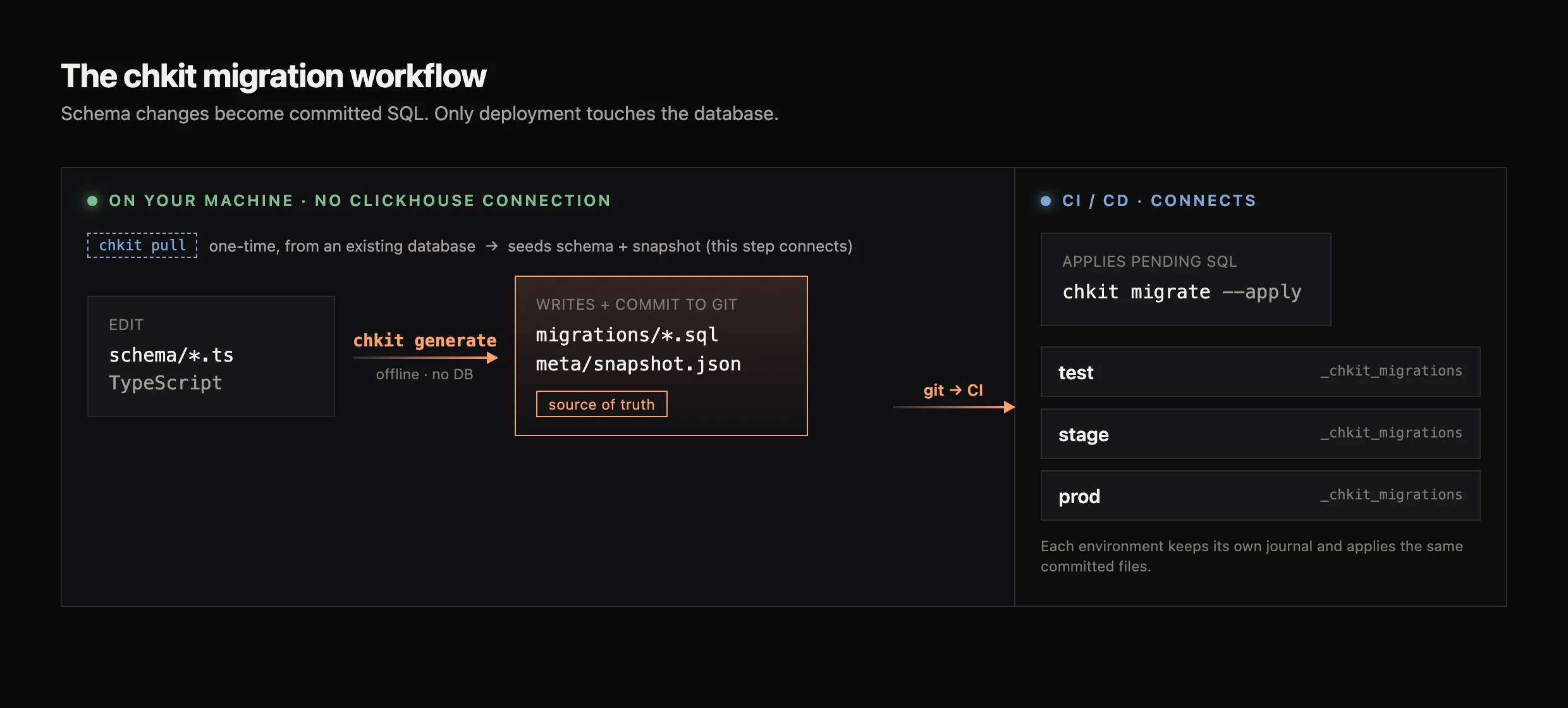
chkit uses the second approach. chkit generate computes the diff and writes it to a SQL file; chkit migrate later replays that exact SQL. The migration is a reviewable artifact that travels with the pull request, and deployment is deterministic because it never regenerates anything. Because the diff is worked out ahead of time, computing it needs no database connection at all. (For the full split of which commands connect and which run offline, see the CLI overview.)
The diff needs a baseline: that’s the snapshot
Section titled “The diff needs a baseline: that’s the snapshot”To compute where the schema is against where it should be, the diff needs both sides. The target side is your schema code. The baseline, the last-known state, has to come from somewhere.
There are two ways to supply that baseline. Introspect a live database, which ties every diff to a reachable instance and to which instance you point at. Or read a committed file. chkit keeps the baseline in a file: chkit/meta/snapshot.json.
This is what snapshot.json is for. generate diffs your schema against the snapshot, writes the migration SQL, then rewrites the snapshot to the new state so the next diff has a fresh baseline. Because the baseline is a committed file rather than a live introspection, generation is deterministic: the same schema and snapshot always produce the same migration.
What to commit
Section titled “What to commit”generate writes two files, and the record of which migrations have run lives somewhere else entirely. That split is the whole story of what belongs in version control.
Two artifacts, both committed
Section titled “Two artifacts, both committed”generate produces two files, both under chkit/ by default. They are the source of truth for a migration, so both belong in version control.
| File | What it is | Commit? |
|---|---|---|
chkit/migrations/<timestamp>_<name>.sql | The SQL to apply, with a header describing each operation and its risk level. Without --name it is named <timestamp>_auto.sql. | Yes |
chkit/meta/snapshot.json | The last-known schema state. generate diffs against it, then overwrites it with the new state. | Yes |
The default locations come from outDir (./chkit); migrationsDir and metaDir override the two subfolders individually. See Configuration.
Both files belong in git. migrate decides what is pending by comparing the .sql files on disk against what it has already applied, and it verifies a checksum of every applied file that is present. These checks validate the artifacts that are committed — they do not catch one you forgot to commit: a missing migration is simply absent from the pending set and never runs, and the checksum verification skips an applied file whose .sql is gone rather than failing. Keeping both files in the repo is a discipline to enforce in code review, not something the tooling detects for you.
Applied state is not committed
Section titled “Applied state is not committed”The record of which migrations have run is deliberately not a file. It lives in a _chkit_migrations table inside each ClickHouse database. That is what lets test, stage, and prod each sit at a different point while sharing the same committed files: every environment tracks its own applied set, so there is nothing about applied state to commit. See chkit migrate.
The team workflow this produces
Section titled “The team workflow this produces”This is the workflow for a team where only some developers can reach production. Assume one person has a one-time connection to prod and nobody else does.
-
Seed the project once. The person with access runs
chkit pullagainst prod to introspect the existing schema into schema files, thenchkit generateto produce the initial snapshot. Commit the schema files, the migration(s), andsnapshot.json.Terminal window chkit pull --out-file ./src/db/schema/pulled.ts # connects to prod, one timechkit generate --name baseline # offline; writes snapshot.json -
Everyone else works offline. Any developer edits the schema files and runs
generate. No production access and no local ClickHouse are needed, because the snapshot is the baseline being diffed against.Terminal window # edit src/db/schema/*.tschkit generate --name add_level_column # offlineThey review the generated
.sqland commit it with the updatedsnapshot.json. The pull request now contains the exact SQL that will run. -
CI deploys.
chkit migrate --applyruns in the pipeline against each environment. This is the only step that connects, and it applies the reviewed, committed SQL. See CI/CD integration.
Nothing in this loop asks a developer to generate against a live ClickHouse. Doing so would tie a migration’s correctness to that instance matching prod; diffing against the committed snapshot removes that dependency.
Working on parallel branches
Section titled “Working on parallel branches”snapshot.json is one file that every chkit generate rewrites in full, so two branches that each generate a migration both change it. The branch that merges or rebases second conflicts on it, at least on the generatedAt line, even when the branches changed unrelated objects. Both branches’ migration files and the merged schema files are already correct; only the snapshot has to catch up.
Before you merge or rebase, check that each branch is fully generated: chkit generate --dryrun reports 0 operations on it. After upgrading chkit, run chkit generate and commit any migration it writes before you rebuild.
While snapshot.json has conflict markers, every command that reads it stops with contains unresolved merge conflict markers. Resolve the conflict with chkit snapshot rebuild (TypeScript only; chkit-py does not have it yet):
-
Resolve the conflicts in your schema files first. The snapshot is rebuilt from them, and a schema file that still has conflict markers stops the rebuild.
-
Rebuild the snapshot and compare it with both sides. A conflicted
snapshot.jsoncannot be compared entry by entry, so the review happens on the rebuilt file. During a merge the other branch isMERGE_HEAD; during a rebase the commit being replayed isREBASE_HEAD.Terminal window chkit snapshot rebuildgit diff HEAD -- chkit/meta/snapshot.jsongit diff MERGE_HEAD -- chkit/meta/snapshot.json # during a mergegit diff REBASE_HEAD -- chkit/meta/snapshot.json # during a rebaseEvery entry that differs from one side must come from a migration file of the other side.
-
Stage the file and finish the rebase or the merge:
Terminal window git add chkit/meta/snapshot.jsongit rebase --continue # or, for a merge: git commit --no-edit
Do not resolve the conflict by taking one side: that drops the other branch’s entries, and the next generate writes a duplicate migration for them. A rebuild records every schema definition as migrated, so check when not to rebuild first. If both branches changed the same table or view, read When both branches change the same object before you commit.
Promoting across environments
Section titled “Promoting across environments”The same committed migration files flow through every environment: test, then stage, then prod. Each has its own _chkit_migrations journal, so migrate applies only what an environment is missing and skips what it already has. Promotion is running chkit migrate --apply against the next environment with the same commit checked out.
Hand-written migrations
Section titled “Hand-written migrations”A migration does not have to come from generate. Because deploy replays committed .sql files, migrate applies any .sql file in the migrations directory that is not yet in the journal, whether chkit wrote it or not. chkit generate --empty scaffolds a blank file with the standard header, or create the file by hand.
To add custom SQL such as a data seed or a backfill, create a file in chkit/migrations/ following the <timestamp>_<name>.sql naming convention so it orders correctly alongside generated ones:
-- chkit/migrations/20260707120000_seed_lookup_data.sqlINSERT INTO default.regions (id, name) VALUES (1, 'emea'), (2, 'amer'), (3, 'apac');Run chkit migrate and it is picked up like any generated migration, applied in timestamp order and recorded in the journal. A few things carry over from generated migrations:
- It is immutable once applied. The checksum gate blocks edits afterward, the same as for generated files.
- It needs at least one statement.
migraterefuses a pending file that holds only comments, so an unfinished stub is never recorded as applied. See empty migrations. - Destructive statements (
DROP TABLE,DROP COLUMN,TRUNCATE, …) require--allow-destructivein CI, even when hand-written. See destructive operation safety. - Large data loads, such as a multi-minute
INSERT ... SELECTor a backfill, can be markedmode=asyncso chkit submits the query without blocking on the HTTP response and polls for progress. See async operations.
For structural changes that must preserve data, the common pattern is a hand-written migration that creates a new table, runs INSERT INTO new SELECT ... FROM old, then swaps names. See the DSL reference.
Related pages
Section titled “Related pages”- Tutorial: your first schema — the same loop, hands-on from an empty folder
chkit generate— the offline diff-and-write command in detailchkit migrate— applying migrations, the journal, checksums, and destructive-operation safetychkit pull— introspect an existing database to seed a project- CI/CD integration — running
generate,migrate, andcheckin a pipeline - Configuration —
outDir,migrationsDir, andmetaDir chkit snapshot— rebuildsnapshot.jsonafter two branches conflict on it